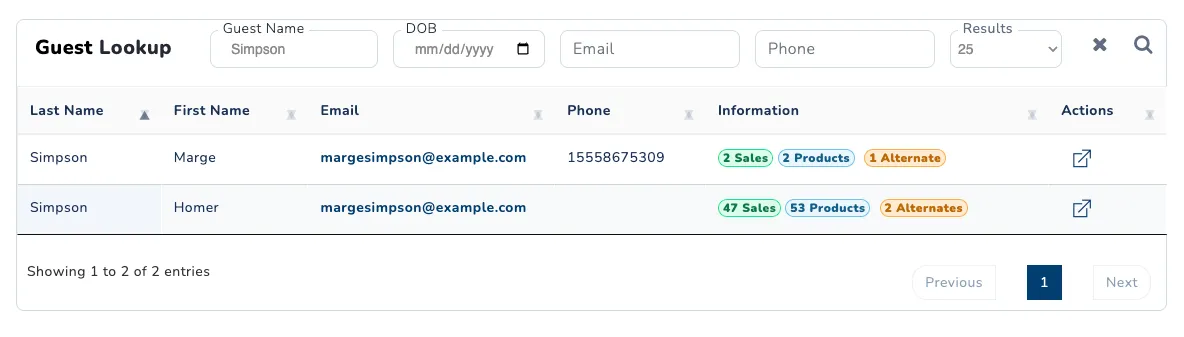
Guest Search
The guest search page allows you to look up any guest profile that has interacted with your resort. You can search for guests based on the following parameters:
- Guest Name: First, last, or full name of guest.
- DOB: Guest’s date of birth.
- Email: Email address used to sign up.
- Phone: The confirmed phone number of the guest. Not all guests confirm their phone numbers.
There are certain circumstances that might make each of these search fields unreliable. It is possible there are multiple guests with the same name. Not all guests may have been required to provide a date of birth. Not all guests confirm their phone numbers. Guests who are between the ages 13 and 17 cannot be required to provide an email address, and guests under 13 cannot have one. Some guests who register their account using Apple’s sign in option may have obscured email addresses (Example: nqv5asgp19@privaterelay.appleid.com). It’s best to use multiple search fields with broad search terms.
After making a search, a list of guests matching those terms will appear. Control how many guests are listed using the Results dropdown. At a glance, you can review:
- Last Name
- First Name
- Email: Email address used to sign up. Accounts managed by a minor’s parent or guardian may not have an email address.
- Phone Number: Confirmed phone number of the guest.
- Information: Number of sales made and number of products owned.
To view a guest’s full profile, click on the view button in the actions column.